


Mobile maintenance apps for SAP PM
View and process maintenance orders, create notifications, access equipment, and enter measurements and reports directly from a smartphone, tablet, or computer.




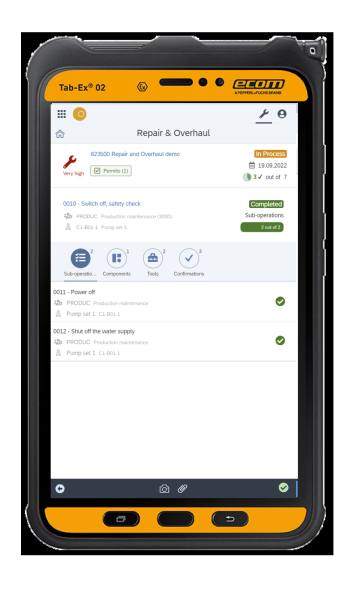
Priority and status: The order displays its priority and progress status, so the technician knows what to handle first
Attached work permit: The security clearance is in order; it is not on a separate piece of paper
Equipment and Technical Positions: SAP PM Data Reported On-Site, Without Navigation
The entire order on one screen: operations, components, tools, and confirmations—all without switching transactions
Real-time progress tracking: Each validated step is immediately uploaded to SAP
Photo and attachment: the terminal's native capability, which the standard SAP RF does not utilize
Overview
SAP mobile apps for maintenance technicians
HRC Maintenance is a mobile maintenance solution integrated with SAP PM. It allows technicians to view and update their maintenance data directly in the field.
- Simple interfaces tailored for field technicians
- Can be used on a smartphone, tablet, or computer
- Access to SAP data relevant to the job
- Traceability of completed tasks
- Applications configurable according to roles and processes
Processes Covered
Which SAP PM processes can be managed on a mobile device?
SAP Maintenance Orders
SAP Maintenance Notifications
Measurements, Readings, and Inspections
Confirmation and Report on the Intervention
- View orders and tasks to be completed
- Access statuses, priorities, instructions, and useful information
- View the relevant equipment and operational locations
- Access the documents needed for the operation
- Create and view maintenance notifications
- Describe a problem or a service request
- Add comments, photos, or on-site information
- Identify the affected equipment or location
- Enter measurements and readings directly in the field
- Create checklists and perform inspections
- Fill in relevant information during the job
- Enter Times and Confirmations
- Update the status of the service call
- Enter details of work performed, comments, or photos
- Upload the information to SAP for tracking and traceability
The Solution in Action
Field data entries are structured to ensure data quality and facilitate their upload to SAP PM. Read More
SAP PM on Mobile: The Field Technician's Experience
HRC Maintenance presents information clearly and supports technicians before, during, and after their assignments.Field data entries are structured to ensure data quality and facilitate their upload to SAP PM. Read More

Benefits
Why Go Mobile with SAP Maintenance?
TOUCH
Simplify Access to SAP
Provide technicians with a mobile interface tailored to their daily work rather than complex, non-responsive screens.
TOUCH
Reduce data re-entry
Collect the information needed to track service calls directly in the field and minimize duplicate data entry.
TOUCH
Improve Data Quality
Organize data entry, checks, and confirmations to ensure more reliable maintenance information in SAP.
TOUCH
Improve traceability
Keep a record of maintenance work, measurements, and actions performed on the equipment.
TOUCH
Accelerate Adoption
Accelerate Adoption
Offer users simple, guided workflows tailored to their roles and equipment.
TOUCH
Standardize Your Practices
Deploy a common set of applications across multiple sites, teams, and countries while retaining the ability to configure local usage.
Deployment
Quickly move from need to real-world application
1
Process Identification
Selection of maintenance operations, applications, and affected user groups.
2
Installation in the SAP Environment
Deployment of HRC Maintenance applications in the customer's system.
3
Configuration
Customize screens, roles, rules, and workflows based on the selected processes.
4
User Testing
Validation of applications with technicians under real-world operating conditions.
5
Deployment
Rollout to teams and gradual expansion to other processes or sites.

ITER is digitizing its SAP field maintenance operations
ITER relies on HRC Maintenance to digitize maintenance operations and provide field teams with easier access to information from SAP PM.Mobile apps help reduce paper usage, facilitate data entry in the field, and improve data continuity between service calls and SAP. Read More

SAP Integration
An application directly integrated with SAP PM
Compatible with SAP ECC6 and S/4HANA
HRC Maintenance uses SAP ECC6 and S/4HANA for SAP PM processes.
Without additional middleware
Applications communicate directly with SAP without adding a complex intermediate layer.
SAP remains the industry standard
Equipment, maintenance orders, notifications, statuses, and histories continue to be managed in your SAP environment.
Seamless Integration Between SAP and the Field
Technicians review the data needed for the service call and submit their information from their mobile devices.
Ready-to-use and scalable applications
The applications cover standard maintenance processes and can be configured to meet the project's needs.
FAQ
Frequently Asked Questions About Our SAP PM Mobile Apps
Is there a mobile app for SAP PM?
Yes. HRC Maintenance is a mobile and web application solution integrated with SAP PM. It allows technicians to access SAP maintenance data and perform their key tasks directly in the field.
Can SAP maintenance orders be viewed on a mobile device?
Yes. Technicians can view maintenance orders, operations, equipment, instructions, and other information needed for the job from their terminals.
Can you create an SAP PM notification from the field?
Yes. Depending on the applications deployed, users can create or update a maintenance report, identify the affected equipment, and add field information, comments, or photos.
Is HRC Maintenance compatible with SAP S/4HANA?
Yes. HRC Maintenance can be used with SAP ECC6 and SAP S/4HANA for SAP PM maintenance processes, depending on your company's environment.
How do I use SAP PM on a smartphone or tablet?
HRC Maintenance provides mobile-friendly interfaces for viewing and updating SAP information relevant to field service tasks, without requiring technicians to navigate through standard SAP transactions.
Does HRC Maintenance require middleware?
No. HRC Maintenance is designed to communicate directly with SAP without adding any additional middleware.
Can HRC Maintenance work offline?
Depending on the applications and configuration selected, certain scenarios may be designed for offline use.
What devices can be used?
The apps can be used on smartphones, tablets, or computers, depending on the users' needs and the process.
Should we replace the existing SAP processes?
No. HRC Maintenance builds on existing SAP processes and data and makes them easier for field teams to use.
Can we deploy only certain applications?
Yes. Applications can be rolled out gradually based on maintenance processes, locations, and the affected populations.
Can the solution be deployed in multiple countries?
Yes. HRC Maintenance can be deployed across multiple sites, countries, and languages while maintaining a common foundation.
Can the applications be adapted to our processes?
Yes. The applications are ready to use but can be configured to accommodate the organization's specific roles, rules, and needs.
Show more